
- Image via Wikipedia

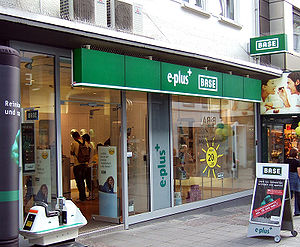
Germany is Europe’s largest economy and a key market for FON. People in Germany love FON and the Fonero community there is very active. However, FON’s WiFi footprint in Germany is smaller than in other European countries, like the UK and France, where our Telco partners have helped us grow. Fon´s partnership with E-Plus, is about to change that. Today FON is announcing a partnership with the E-Plus group in Germany. With more than 18 million subscribers and annual revenues of 3.2 billion Euros, the E-Plus group is Germany’s third largest mobile operator. E-Plus is part of KPN group and is considered an innovator in the German mobile Telco market. E-Plus will help the FON community grow in Germany with a planned series of joint activities starting this year. For example, E-Plus will install Foneras in more than 300 E-Plus stores in prime locations throughout Germany. Together, FON and E-plus will target cafes and other public places where we will install FON Spots as part of the “City FON” initiative – similar to the “Chueca WiFi” and “Shoreditch” density projects in Spain and England. E-Plus will promote FON to their 18 Million subscribers and will help us to encourage them to become Foneros. E-Plus customers who register for the collaboration will be eligible for discounts on Foneras and will get free trial access to the FON WiFi network and once they installed their Fon routers they will be able to roam the world for free connecting to other Foneros.
The FON E-Plus partnership is great for two reasons. E-Plus has great marketing power that will increase FON awareness and help the German FON community grow faster. E-Plus is the first pure mobile operator to partner with FON. Initially journalists and bloggers had argued that Fon would be stopped by fixed and mobile operators. Some of these experts confused Fon with a P2P telco network. But the difference here is that while P2P networks destroy value for the music labels, Fon increases value to telcos. How? Well, as our partnership with BT, known as BTfon, and others have shown, Fon generates value both for consumers and telcos. For consumers the proposition is clear, you share some extra, limited, bandwidth at home in a secure way with a second SSID or WiFi signal, and in return you roam the world for free. For fixed telcos, Fon increases customer loyalty, reduces churn, reduces customer acquisition costs. Fon enabled fixed operators can also resist price decreases as their customers have WiFi at home and everywhere else.
Now, for mobile operators, the one big benefit of Fon is reduced capex (investment in the network). 3G is a phenomenal service because of its coverage and frankly no matter how many hotspots we put, Fon will never compete with 3G in terms of coverage. So customers who want to have Internet in a car or to find it no matter where they are will always have to use 3G. But when there is WiFi, there are now tons of mobile phones that have a WiFi option, including the iPhone, Nokias, Samsungs, HTCs and others. And use of WiFi is advantageous to operators because: customers are happy with the speeds, they pay their monthly service anyway and they don´t use the much costlier 3G infrastructure. 3G is great for operators for voice and light data. But when people start downloading 300MB movies and TV series to watch in their mobile devices, operators either have to charge for that bandwidth making movies expensive, or prefer that people use WiFi. Moreover, some of the most popular gadgets in the world, such as the Nintendo DS, the PSP and so on, only come with WiFi. In this way, E-Plus can now service its customers on all of their connected devices.
All in all, this proves a point I have been making for a long time. FON and Mobile Telcos make great partners. WiFi is a complement to 3G. Moreover, we are very excited that this announcement coincides with the launch of the Fonera 2.0. The Fonera 2.0 has just been introduced in Germany (not yet in the UK) and it is a router that not only gives you free roaming but also manages your transfers to the Internet. Fonera 2.0 on its own sends your videos to Youtube, your pictures to Flickr, downloads your files from Rapidshare or Megaupload, or Bittorrent (disclosure this app is working poorly at the moment) and it is especially good for converting 3G signal from HSDPA modules to WiFi.
If you would like to interview me about this announcement please use the contact form of this blog and I will be happy to answer questions.

2009 1
I am a pilot and I believe aviation could be much safer
Published by MartinVarsavsky.net in General with No Comments
I am a pilot. Not a professional pilot, as in real life I am a CEO of a tech company. But in my spare time I became a pilot and fly a small jet, a Citation Jet. During my training as a pilot I was shocked to find out how poorly equipped planes are. Planes are all about radios, VOR, DME, ILS and other systems invented over 50 years ago and still running the cockpit. When I was involved briefly involved in the airline business (with poor consequences I must say) I could not believe how badly equipped planes are, especially when they cross the Atlantic. What just happened to the Air France airliner is but a proof of everything that can wrong in aviation.
Would you believe it if I told you that many planes that cross the Atlantic do not even have GPS systems and instead use highly inaccurate, archaic positioning systems that would be useless to report a crash position? I don´t know what happened to that Air France flight but there´s a reason neither I nor anyone knows. It´s because planes don´t report where they are unless pilots do and many times pilots don´t even know precisely where they are. This is what AP says:
The area where the plane could have gone down was vast. Brazil’s military searched for the plane off its northeast coast, while the French military scoured the Atlantic off the West African coast near the Cape Verde Islands.
Aviation today is as it was 30 years ago. Planes do not carry GPS geolocators. Even if that Air France pilot was as good as the pilot who landed in the Hudson and even if people could get out of the plane after it water landed, passengers would probably be dead by the time we found the plane. Presently in the aviation world we only know where planes are when they fly near or over land. And that is because the only way to know where a plane is is to see the plane with a radar. Planes in the Atlantic do not themselves say where they are and controllers can´t see them.
To know where they are you need a pilot talking over a lousy quality HF radio to report where he/she is using inaccurate equipment You would also be astonished to find out that even though satellite telephony has existed for over a decade many planes that cross the Atlantic do not carry satelllite phones in case the pilot´s radios fail. Flying today is still all about radars and radios and most signals don´t make it to the mid Atlantic, Pacific or many areas over which we fly today. Moreover many parts of the land mass are not covered by radars and planes have to tell each other more or less where they are or choose primitive methods such as flying at different levels not to crash into each other. Satellite technology has not made it to planes. GPS are there, in some but not all commercial planes. But they are not supposed to be used for landing. Landing is supposedly done with antiquated radio systems that seem straight out the 1950s because USA may turn the GPS off in case of war.
Why are things this way? I don´t really know. It´s a miracle that there are no more accidents. Yes planes are safer than cars but they would be much safer if their functioning combined elements of radio communications as now with elements of satellite communications and many, many more technologies available today. Indeed sometimes new piston planes have better instruments than 747s.
As we know pilots can only handle so much information. But planes could have many more instruments. If planes were in permanent contact via satellite they could be reporting the most minute details of what is happening with them to say a global Airbus or Boeing maintenance center. And even though this information would be impossible for the pilot to digest, people and/or computers at Airbus or Boeing could be monitoring a lot more information every second a fly is on its way. They could alert the airline and the pilots of minor yet possibly fatal flaws if not attended. While that Air France plane that vanished a few hours ago was crossing the ocean Airbus could have been receiving tons of information from the engines, tanks, instruments, and all critical parts of the plane. Instead we know nothing. We don´t know what happened to the plane and a tragedy could have been prevented. But now, do not have the information of where the accident actually happened. Yes, the plane has a radio that should float or be somewhere and should tell rescuers more or less where it is but is that all we can do for airline safety? Why do we need a black box? All the info in a black box should be on the ground the moment it is created. Think about this, even a passenger with a geolocator as the one used for anti car theft would have been able to send more information than the whole plane before the crash. Nowadays a person carrying an iPhone or a Nokia E71 pointed at the window could have better positioning information and software than the pilots of the plane. For 1000 euros a plane or less we could at least know precisely where each aircraft. Why we don´t it? And then there´s weather information. Planes that cross the Atlantic sometimes face ferocious CBs that go up to 40,000 ft. There is now instrumentation available over satellite that gives even small aircraft real time weather information. But this instruments are not available yet to most large commercial aircraft that cross the Atlantic. And a CB could bring down a plane and maybe that´s what brought the AF flight down.
If anything our collective lack of action is a conspiracy of people trained in the past scared of change. Many pilots surprisingly actually fear modern instruments. But I am not advocating the end of the pilot. I am advocating support for pilots who have too much in their hands and could receive much more help while flying if their planes were in constant contact with the ground but not always through them. If what brought down the AF flight was a high hurricane like cloud known as CB avoiding that cloud would have been incredibly easy with a combination of the information that is available to a pilot through his own radar and ground information as to where all the CBs maybe located. We now have extremely accurate 2 hour forecasts. It is negligence that those are not in the hands of all pilots.
Today Dr George Tiller of Wichita, Kansas was shot and killed. If he is found to have been killed because he performed abortions, most likely, he will be one of many victims of this type of violence. According to CNN:
If Tiller was slain because of his work, he would be the fourth U.S. physician killed by abortion opponents since 1993. In addition, a nurse at a Birmingham, Alabama, clinic was maimed and an off-duty police officer was killed in a 1998 bombing by Eric Rudolph, who included abortion among his list of anti-government grievances.
To me these murders are clearly acts of terrorism. They fit the definition of terrorism because they are violent acts inflicted on a small group of people with the intention to scare and change the behavior of a large group of people. Yet media does not call these murders acts “Christian terrorism”. They don´t because, as we all know, most Christians are not terrorists. But how come then if most Muslims are not terrorists we call terrorists who are Muslim, Muslim or Islamic terrorists?
I end with an account about Dr George Tiller from Planned Parenthood.
Dr. Tiller was the epitome of high quality medical care underscored by deep compassion for his patients. While he was not a Planned Parenthood provider, Dr. Tiller provided critical reproductive health care services, including abortion services, to women facing some of the most difficult medical circumstances. He was continually harassed by abortion opponents for much of his career – his clinic was burned down, he was shot by a health center protestor, and he was recently targeted for investigation only to be acquitted by a jury just a few months ago.
A life of terror.
2009 30
Fighting for the right to use Spanish in Spain
Published by MartinVarsavsky.net in General with No Comments
The problem of over regulated societies is that what in some countries is a matter of individual choice in these type of nations they become a matter of state. USA for example does not regulate languages. If a person in USA wants to promote products in Spanish, Korean, Chinese, or any other language say advertising on the street or public transport he/she can go ahead. But in Spain language is unfortunately regulated and this regulation turns language away from a source of understanding into a source of public conflict. And what is more suprising to Latin Americans living in Spain such as myself is that in many parts of Spain you are not allowed to promote yourself and your activities in Spanish or communicate openly in Spanish even when you want to address yourself to a Spanish speaking audience. But this regulations are very inconsistent because while you may not be able to advertise your bread in Spanish on the street you can advertise it in Spanish in the leading newspapers of the non Spanish speaking regions which are in Spanish. Fortunately there´s a new movement that is simply asking for freedom to use whatever language you want whenever you want. And yesterday this movement, which is the first time I hear about it. Started with a massive demonstration in Palma, Majorca. What Spain needs is simply to deregulate languages in any activity that is not in the public sector.
The news of Andrew McLaughlin’s departure from Google to work as Deputy Chief Technology Officer of the Obama administration just came out in the New York Times. The article mentions that there are critics who believe that this move will benefit Google as a company. I have a response to this criticism, but before I make them I would like to disclose that I am a friend of Andrew McLaughlin and that Google is an investor in Fon, the company that I am CEO of. Regardless of these facts I have chosen to write this post as it is valid not just for this case but for anyone who moves from industry to government.
In general I don’t understand why journalists believe that a move from industry to government is somehow very different from a move from industry to industry. If Andrew McLaughlin had moved from Google to Cisco, Cisco’s CEO would not hire him thinking that he will promote the interests of Google at Cisco. When a banker moves from Goldman Sachs to Morgan Stanley, a direct competitor, people at Morgan Stanley consider this a great success. And it is a similar success for the Obama team to have convinced Andrew to leave his fantastic job at Google to serve the US Government. As Andrew promoted the interests of Google when he was at Google, he will now protect the interests of the American people working for the US government. And we should all be happy for that. I can’t think of a better person than Andrew to do this job.
If you still think about Spain as a conservative, Catholic country you can change your mind. Spain is one of the most liberal and secular countries on the planet now, up there with The Netherlands. Gambling, prostitution, are either legal or losely regulated. Even downloading movies and music is legal in Spain. And gay marriage is of course, legal as well. But today a controversy arose when a judge said that, as a Catholic, he objected to marry gay people. Newspaper El Pais reports Judge Pablo de la Rubia asked if he could possibly be excused from marrying gay couples. Surprisingly he was told by the Supreme Court that he had to marry gay couples whether he approved of their marriage or not. The argument went that because it´s legal for gay people to get married as a judge it´s part of his job to marry them. While I see the logic to the argument I think the Supreme Court´s position is too extreme. If Judge De la Rubia thinks it´s wrong for gay people to get married, he should be excused from marrying gay people. Why? For a simple reason that has nothing to do with the law. His demeanor may spoil what could be the happiest moment in the couple´s life. There are enough other judges who will be happy to do the job. The problem with gay marriage, whether in Spain or USA is that the debate many times centers around legal principles. And while doing this people in government forget that what gay marriage is, is the desire of two people to at least try, to live happily ever after.
In this video I show how I can access the Fonera in my office when I am at home using the DynDNS app. This is useful to upload pictures, videos, or to download pictures, videos, movies (always own the content of what you download) with the many services supported by the Fonera including Youtube, Flickr, Facebook, Picasa, Bittorrent, Megaupload, Rapidshare and others.
2009 28
French ISP Free launches a service similar to FON
Published by MartinVarsavsky.net in General with No Comments
I had the idea of FON in late 2005 in Paris, France. I was desperately looking for WiFi. While I found a lot of WiFi signals, I could not access a single one of them. They were all locked. It was then that the key concept of Fon dawned on me “share a little extra WiFi at home and roam the world for free connecting to other people´s routers”. For a while the Fon idea seemed to be utopic. Now thanks to Fon itself and now to progressive carriers such as Free of France it´s becoming a global reality.
This week, the French ISP Free launched a community WiFi service similar to ours at FON. Owners of a Freebox v5 who share with FreeWiFi will be able to surf off the WiFi router of other Free customers. As with FON, Free customers must share to get access to the FreeWiFi signal, which is a second SSID broadcasted by their Freebox.

Still there is a big difference between the new community launched by French ISP Free and Fon and that is that it is a closed community available only to Free customers and only in France as Free only operates in France. Moreover since this community has no aliens neither Free nor its customers can make money offering their WiFi to non donors as is the case with Fon.
FON grows either by selling its own Fonera and by partnering with Telcos around the world such as British Telecom, SFR Neuf (Free´s competitor) and others. But even though Free is so far not a member of the Fon community itself and some people have asked me if we did not feel threatened by Free acting alone we congratulate Free for the move as it validates Fon´s concept. While it may not be apparent to journalist who cover the Internet and Telecoms sharing a la Fon is a way that operators have to reduce churn, provide more with no additional cost and differentiate themselves from carriers that only offer you internet at home when you pay at home.
2009 27
Fonera 2.0 back in stock
Published by MartinVarsavsky.net in General with No Comments

- Image via CrunchBase
We very much apologized for the delays in delivering the Fonera 2.0. We miscalculated demand and ran out of the first order. Good news is that we just received our new cargo and the Fonera is now again available in Continental Europe and Japan. We are sorry that it is still not available in the UK and USA. You can order yours here. Or here. And the Fonera is an open source project. You can follow all the new developments in the blog of the Fonosfera.

2009 27
Internal Memo at Fon on the Fonera 2.0 improvements
Published by MartinVarsavsky.net in General with No Comments
I wrote this memo to Fon employees. I edited a few parts that I can´t publish yet and I share it in my blog.
Fonera is now a Computer in a Network:
The Fonera now shows up as a COMPUTER in a PC or Mac. So while you cannot send files to the fonera via wifi using Firefox yet, you CAN send foneras via WiFi by copy and pasting files accessing the hard drive of the Fonera. Soon the Fonera will be able to receive files via WiFi and if you send them to a folder called Youtube it will automatically cue them and send them to Youtube. This is a dream functionality, a real buffer, you have files, you send them via WiFi and they are sent later by the Fonera. No need to use pen drives and actually walk to the Fonera.
Javi is working on a Fontastic Firefox Plug In:
Today I saw the demo of a GREAT Firefox plug in that allows you to choose ANY link on the net, bittorrent, megaupload, rapidshare and http (probably soon ftp) and when you click on it you get a choice to download to your computer or download to the Fonera. It is an intelligent plug in to the point that if you cut and paste a lot of text that is not instructions to download stuff it will decipher the instructions in the long text and do all sorts of different things without you telling it. So it will go to megaupload when it detects a megaupload link, to a direct download when it detects a direct download, to rapidshare, to bittorrent. It is very SMART as it ignores the garbage part of the text. This makes it SO MUCH EASIER than going through the dashboard! Also it has a status bar that tells you what the Fonera is doing while its doing it.
Marketing Inconsistency in the Fonera:
I realized that we have a marketing inconsistency at Fon. In our boxes called our router LA FONERA but the router calls itself FONSPOT. All involved please change this. Fonera has to say FONera not FONspot. Or change the Fon logo to read Fonera but we can´t call it Fonspot anymore. Indeed we should not use the world Fonspot anymore at Fon. Products with two names confuse the hell out of search engines like Google and new search engines like Facebook or Twitter. We don´t have any money to advertise ourselves. We can´t confuse people calling the Fonera a Fonspot. Also let´s drop La Fonera and make it simply Fonera.
Direct Downloads must be Explained:
The Fonera can download ANY FILE on the internet. Not just bittorrent, megaupload and rapidshare. I did not know this and many of you may not know it either. For example if you put below link in the download manager the fonera will get you the latest version of Ubuntu. Pls test this functionality however because it may not work well it is still in beta mode.
http://ubuntu.cs.utah.edu/releases/jaunty/ubuntu-9.04-desktop-i386.iso
Now this is HUGE. Because there are a LOT of direct downloads on the Internet. There is a lot of content, software for example, that people want you to have and they give you download links. The fonera works very well for all uploads and all downloads except torrents which go slowly and only one at a time. But what works about the Fonera is a lot, let´s communicate it well while we improve the Bittorrent functionality. If you look carefully this IS explained in the Download Manager in the fonera. But you have to be pretty geeky to realize that http means that you can download any direct link over the internet. Marketing should find a better way to communicate this feature and Development should explain this in the firmware as well as it now explains for example how to send files to Youtube.